Crowd Sudoku
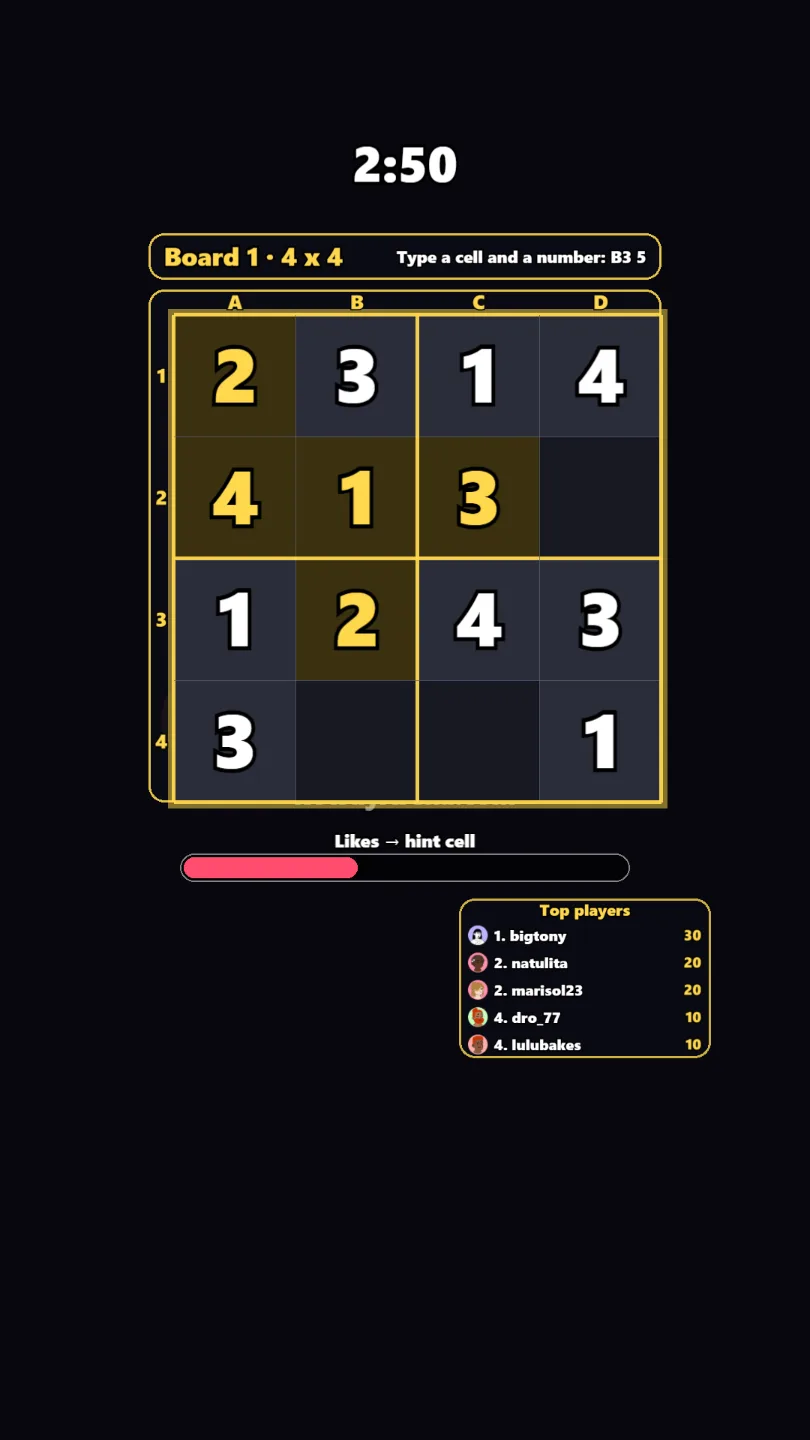
The whole chat solves one Sudoku board together. A viewer types a cell and a number, like B3 5, and the first right number claims the cell with their picture. Finished rows, columns and boxes light up and score more, and a solved board plays a gold wave before the next one is dealt.
What chat types
How viewers play
Type a move
A cell and a number: the first viewer to type the right number for an empty cell claims it, the number goes in with their picture and they score 10 points. After a right move a viewer waits 2 seconds, so one fast typist cannot fill the whole board.
Finish a line
A cell that completes a row, a column or a box scores 10 more for each, with a sweep across it and a ROW!, COLUMN!, BOX! or COMBO! call. The cell that solves the board scores 25 more.
Like and share
Likes and shares fill the hint meter; when it is full, one empty cell fills itself in teal. A hint never fills a board's last cell, so the chat finishes every board.
Miss without losing
A wrong number never costs points. It flashes red, and that viewer waits 3 seconds before their next move counts.
How a round goes
- Countdown: a few seconds to get ready, with the meter and Top players on screen. The first board is dealt when the round starts.
- The boards: a round is a fixed clock, 3 minutes by default (90 seconds to 5 minutes), and the chat solves board after board inside it. Every board is made fresh at the deal and has exactly one solution, so the same board never comes back.
- Board sizes: 4 x 4 (quick, the default), 6 x 6, 9 x 9 (classic), or Climb, which plays a 4 x 4 board first, then 6 x 6, then 9 x 9. Easy, Medium or Hard sets how many numbers a board starts with.
- A solved board: a gold wave runs across the grid with SOLVED! and confetti, and the next board is dealt a few seconds later.
- Results: Top solvers shows the top 3 by points and how many boards the chat solved. A viewer's best round goes on the channel records.
What you control
- Show a cell and New board, from the Live screen with one click or a keyboard shortcut: Show a cell fills one empty cell as a hint, and New board deals a fresh board in place of this one. Points already scored stay.
- How long the round is, the board size or Climb, the difficulty, how many likes fill a hint cell (0 turns the meter off), and how many likes per minute count per viewer.
- Say on screen: your own message, shown big on the overlay.
Want a second voice on stream? Meet the optional AI co-host.
Host tips
- Read a move out loud. When a cell goes in, say who got it and which line it nearly finishes. The How to play card says it on screen: type a cell and a number, like B3 5.
- Start small. A 4 x 4 board falls fast, so a new chat sees a solve in its first minute. Try Climb once the chat knows the moves. See Game settings.
- Unstick a board. When chat is stuck, click Show a cell (key 1) for a hint, or New board (key 2) for a fresh one. See Host moves.
Settings you can change
Every one of these is in the control panel, under Advanced settings, then Games. Changes save by themselves into the theme you are using.
| Setting | Default | Range |
|---|---|---|
| Countdown (s) | 5 | 0 to 60 |
| Results screen (s) | 12 | 3 to 120 |
| Board size | 4 x 4 (quick) | — |
| Difficulty | Easy | — |
| Round length (seconds) | 180 | 90 to 300 |
| Likes for a hint cell (0 = off) | 100 | 0 to 100,000 |
| Likes per viewer per minute for the hint meter | 120 | 0 to 100,000 |
Other games
Arena Battle
Chat attacks the other team, likes heal, and a knocked-out player is back with their next comment.
How it playsTug of War
Viewers pick a side with one comment, then likes and follows push their team in a race against the timer.
How it playsWord Rush
Chat races to type the hidden answers to a category, and each answer goes to the team of the first viewer who types it.
How it playsNumber hunt
Everyone types a number, higher or lower closes in on the secret one, and the first exact guess wins.
How it playsThis or That
Chat votes A or B on every question, and every vote scores, more for an early one: the voters' pictures pile up live under each card.
How it playsTop 5
The whole chat works together to find five hidden answers before three hearts break, and the harder the answer, the more it scores.
How it playsRowdy Run
Every viewer races an orb down a zigzag course for their country, boosted by chat and likes, and the first across the line wins.
How it playsMob Blast
The whole chat fires squads of runners up three lanes, through gates that grow them, to break a fort and its boss.
How it playsRowdy Royale
Every viewer fights for themselves in one arena while a ring closes in, chat attacks, likes heal, and the last one standing wins.
How it playsWord Vault
Chat guesses one hidden five-letter word, every guess shows which letters are right, and the first to crack it wins.
How it playsEvery game is in every version, the free download too.
Related help
-
Crowd Sudoku
The whole chat fills a fresh Sudoku board together by typing moves like "B3 5". The first right number claims the cell; finished lines score more.
-
Host moves
Host moves are the buttons you call live on the Live screen, one set per game. Each shows its key and greys out, with the reason, when it cannot work.
-
Game settings
Each game has its own Round and Game rules under Advanced settings, Games, saved into your theme. Here is every setting and its default.
-
The "How to play" card
A card on the overlay tells viewers what each action does in the game on screen. Move it in the layout editor so TikTok's chat does not cover it.
Ask Rowdy Arena
Type a question about the games, the app or the store. The answer comes from the help pages.
Answers are written by an AI from the help pages. Questions we cannot answer are kept for 30 days, with links, emails, license keys and long numbers removed, to improve the help. Please do not include personal details.
Questions
How do viewers play Crowd Sudoku?
A viewer types a cell and a number, like B3 5 for a 5 in column B, row 3; b35, B3=5 and 5 B3 work too. The first viewer to type the right number for an empty cell claims it, their picture shows on the cell and they score. The whole chat works on the same board, and everyday chat does nothing.
Does a wrong number cost points?
No. A wrong number flashes red on the cell and that viewer waits 3 seconds before their next move counts, but nobody loses points. After a right move a viewer also waits 2 seconds, so one fast typist cannot fill the whole board and everyone in the chat gets a turn at the cells.
How does scoring work?
A right cell is worth 10 points. Each row, column or box it completes adds 10 more, with a sweep across the line and a ROW!, COLUMN!, BOX! or COMBO! call. The cell that solves the board adds 25. Top solvers on the results shows the top 3 by points, and a viewer's best round goes on the channel records.
Which board size should I pick?
4 x 4 suits a small or new chat, since boards fall fast and often and viewers see a solve early. Climb plays a 4 x 4 board first, then 6 x 6, then 9 x 9 for every board after, so the chat warms up. A plain 9 x 9 suits a chat that already knows Sudoku well.
Can a board repeat?
No. Every board is made fresh when it is dealt, from a shuffled grid with numbers taken out while the board keeps exactly one solution. So the same board never comes back in a LIVE or the next one, and a viewer can never type a remembered answer from an earlier round to win it.
What do likes and shares do?
They fill the hint meter under the board, and a full meter fills one empty cell by itself in teal. A hint never fills a board's last cell, so the chat always finishes the board. Set the likes for a hint cell to 0 in the game's settings to turn the meter off for a pure chat game.

Your next LIVE could be a battle.
Free to download, with 10 LIVE hours a month. A key takes the watermark and the hour limit away.
Download freeFreeWindows 10/11, 64-bit